For macOS 15 and later · Apple silicon and Intel · 14-day trial, no account

Tune everything
your Mac plays.

A 31-band EQ, correction for 812 headphones, stereo width and room ambience. No driver, no account, one permission.

14-day trial · One purchase when 1.0 ships, price on this page before you pay · No subscription

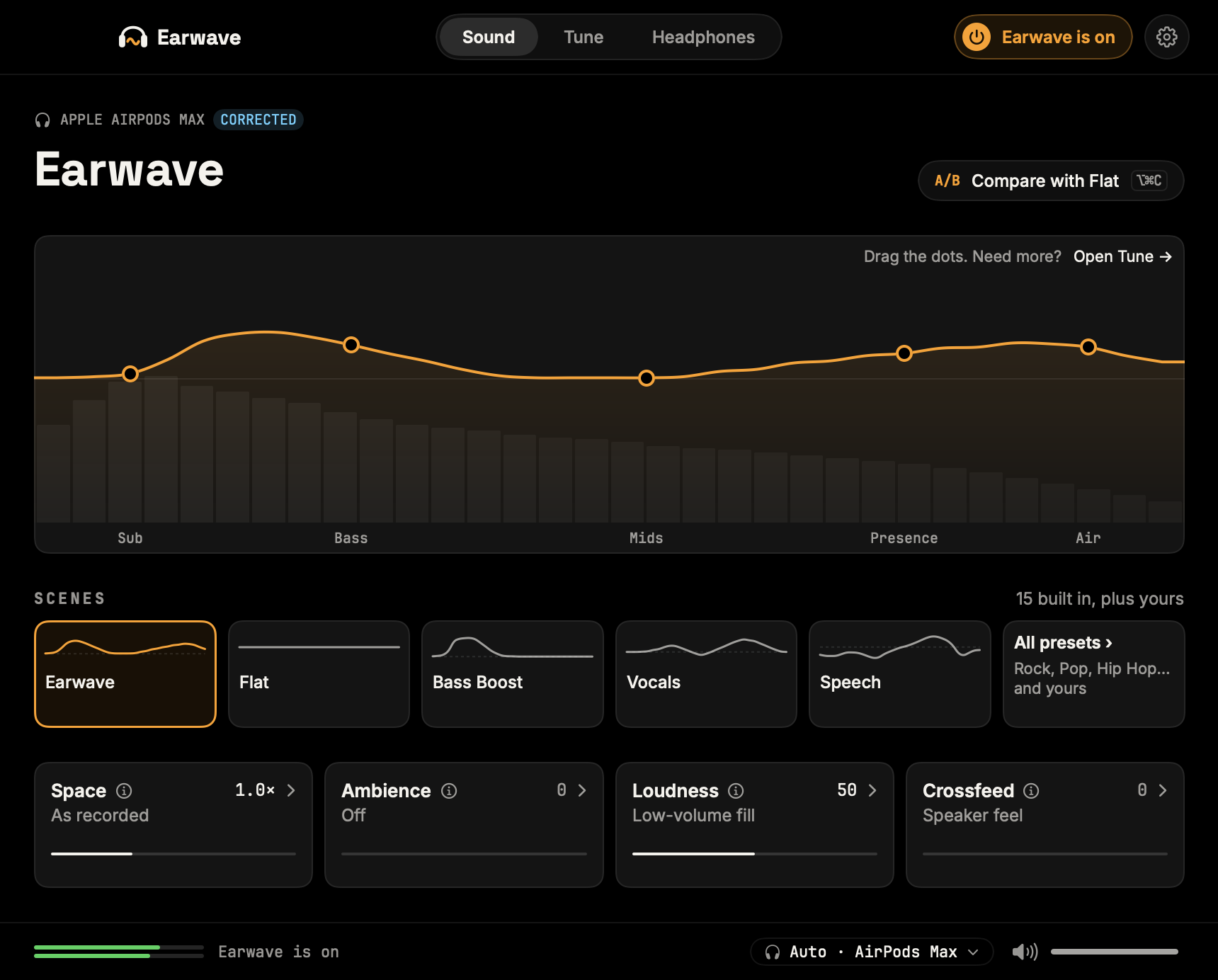
The Earwave window, switched on: the EQ curve with five dots over a live spectrum, the scenes row, and the Space, Ambience, Loudness and Crossfeed cards
Plays through Earwave Apple MusicSpotifyYouTubeNetflixGamesPodcastsCalls: left alone
31EQ bands, 20 Hz–20 kHz, ±12 dB each
812headphone profiles, built in and offline
5% on our M3 AirCPU while music plays · under 1% idle · yours will differ
0 samples differflat EQ vs bypass, with Loudness off, bit for bit

No driver, no kernel extension: Earwave borrows the audio taps macOS already has. CPU measured window-closed, loud music, MacBook Air (M3), macOS 26: chip, rate and buffer move the number. The zero holds until a peak hits the limiter’s −1 dBFS ceiling; tested on sine + stacked tones and drum-like thumps.

Sound

Pick a scene. Drag a dot. Done.

Fifteen scenes, each level-matched to Flat within half a dB, so louder never fools you into better. Five dots shape the curve, and Tune opens all 31 bands when you want them.

  • An A/B button, or ⌥⌘C, flips a scene against Flat mid-song
  • Click-free drags, even while music plays
  • Preamp, bass and treble, and a limiter so boosts never clip
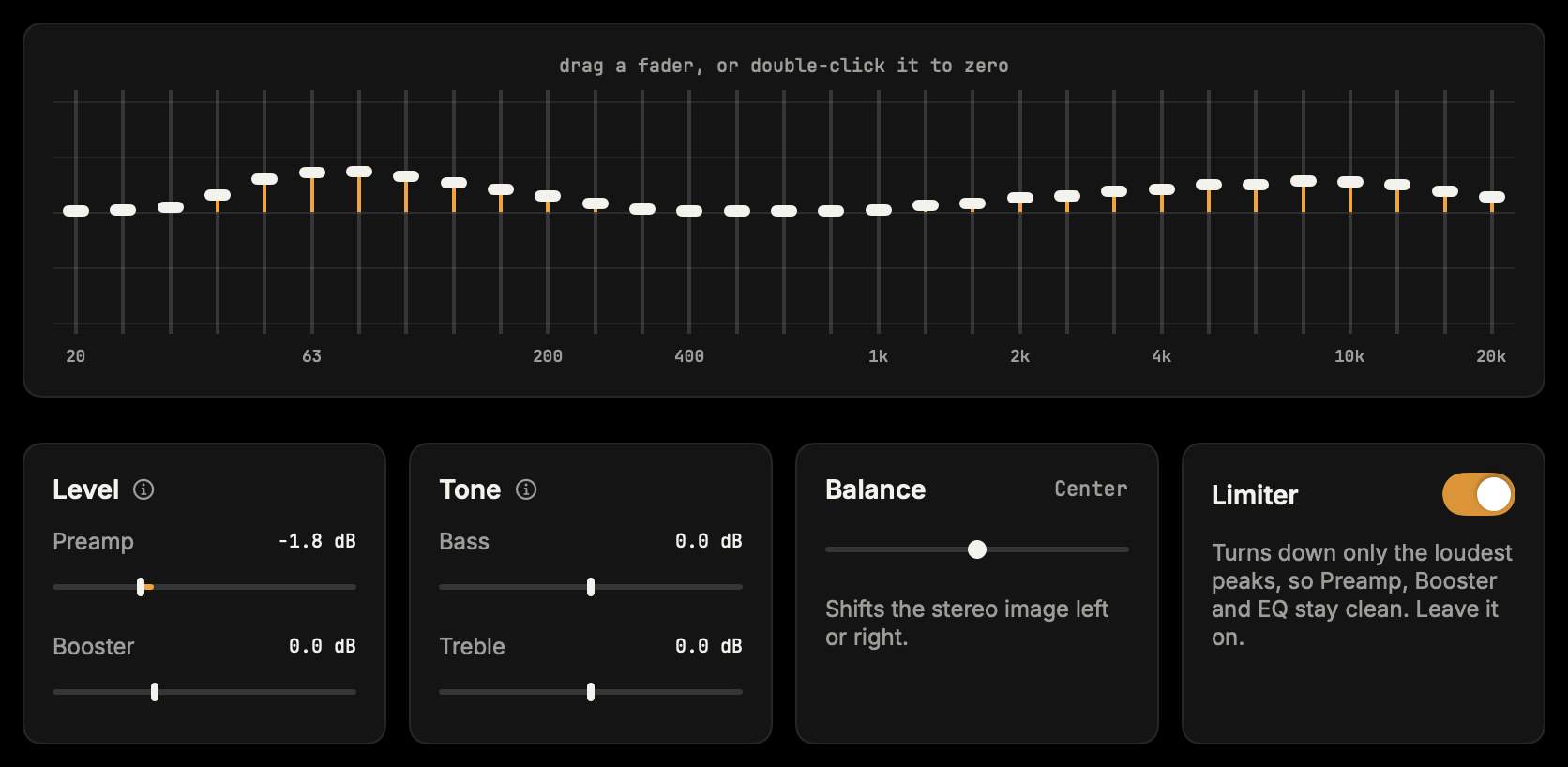
Earwave's Tune tab: 31 faders from 20 Hz to 20 kHz, with the Level, Tone, Balance and Limiter cards below
Tune: every band of the current scene, and the cards below it.

Headphones

Your headphones, without their own colour.

Pick your model once. Earwave flattens what the maker added, so every scene sounds as it was tuned. Spotify’s EQ never reached your games; this does.

HD 650AirPods MaxWH-1000XM5DT 770 Pro+808 more

Not in the list? The EQ, scenes and effects work on anything with a speaker. Browse the 812 models.

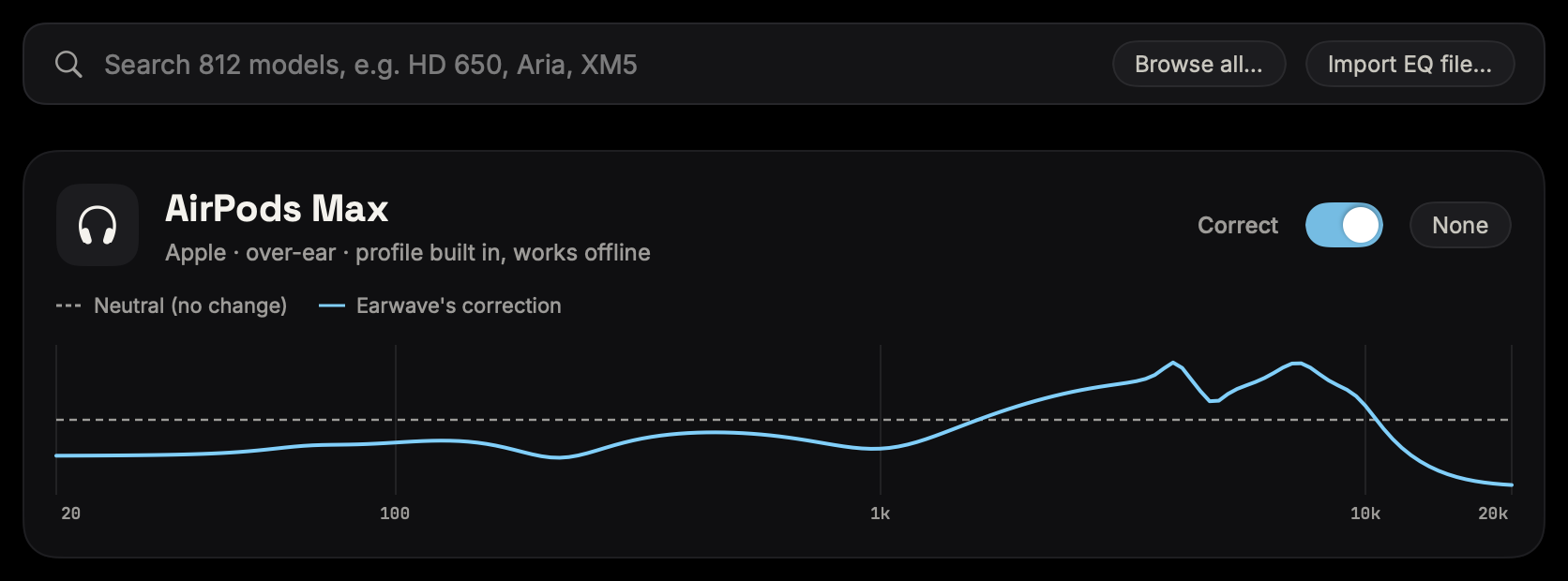
Earwave's Headphones tab: the search box for 812 models, and AirPods Max with correction on, its curve drawn against neutral
The correction, drawn against neutral.

Small speakers, bigger stage.

Space widens the stereo image while bass stays centred. Ambience adds a little room. Loudness keeps quiet listening full, following your Mac’s volume (ISO 226). Space and Ambience start off, so nothing changes until you reach for them.

  • SpaceWidth, bass stays centred
  • AmbienceA touch of room
  • LoudnessLow-volume fill
  • CrossfeedSpeaker feel on headphones

Lives in your menu bar.

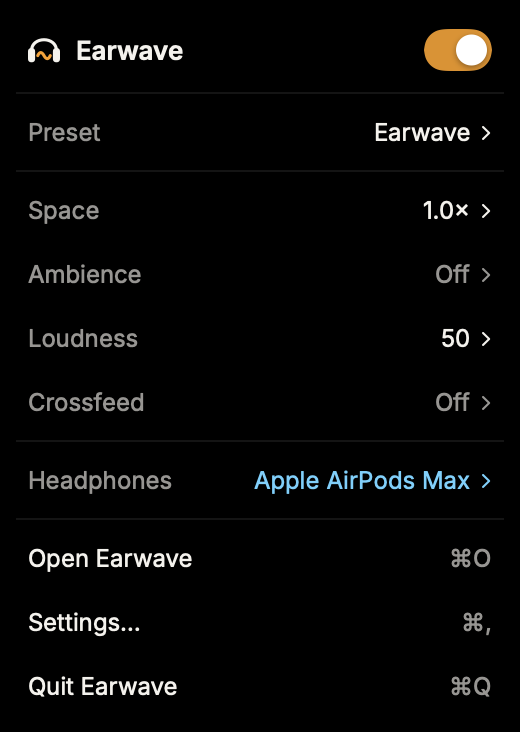
Power, scenes and every effect, one click away. The window stays closed until you want it.

Earwave's menu-bar panel: the power switch, the scene, Space, Ambience, Loudness, Crossfeed and the headphone correction

Two minutes to set up.

No driver and no kernel extension. Earwave uses the audio tap macOS already has.

  1. 01

    Allow one permission

    macOS asks once for System Audio Recording, which is how Earwave reaches the sound your Mac plays so it can tune it. Earwave never uses your microphone, and nothing is saved or sent.

  2. 02

    Pick your headphones

    Choose your model if you have one. Each output keeps its own setup and switches by itself.

  3. 03

    Press play

    Music, browser, video and games play through Earwave. Live calls are left alone on purpose, so macOS doesn’t turn the voices down.

The fourth option.

Ask for a Mac equalizer and the same three complaints come back: it eats CPU, it crashes, it won’t install on a managed Mac. Earwave was built to stop making you choose.

What mattersBoom 3DeqMacSoundSourceEarwave
InstallAudio driver + helperAudio driver + helperAudio pluginNo driver, one permission
Load while playingWe haven’t benchmarked them. eqMac users report ~30% in r/macapps threads.5% on our M3 Air, under 1% idle
EQ depth31-band10-band, parametric is Pro10-band31-band
Headphone calibrationYesYes, 4,600+ databaseYes812 built in, offline
Spatial + roomYesPro onlyNoWidth + ambience included
Price$49.99 one-time (list price, often on sale)$30/yr, or $40 once for one Mac$49 one-timeOne purchase, price below

Competitor facts from their pricing pages and docs, checked September 2026. Tell us if anything changed.

Try it for 14 days.

Every scene, every effect, all 812 headphone profiles. When the trial ends, Earwave stops processing, settings untouched, no account to cancel.

1.0 pricing isn’t set; it will be on this page before you pay anything. One purchase, no subscription. English, German, Spanish and French.

Asked by people like you.

Something else on your mind? Write to us and a person will answer.

hello@earwave.app
How is this different from Boom 3D or eqMac?

Boom 3D is powerful but heavy and tends to break on macOS updates. eqMac has a generous free tier and a long public trail of crashes and CPU spikes; its best features need Pro, at $30 a year or $40 once for one Mac. Earwave does 31-band EQ, headphone calibration, spatial and ambience in one lightweight native app, for one purchase.

Will my Mac show the recording indicator the whole time?

Yes. You should know that before you install, not after. Anything that changes the sound of other apps has to capture it first; that is how macOS works, and it is true of every app in this category. What Earwave does not do is keep it. Audio is processed in memory and played straight back: nothing is written to disk, and nothing leaves your Mac. There is no account and no analytics. Headphone search runs offline, and the only network requests Earwave makes are the update check, which asks earwave.app for a small file listing the newest version, and the download itself if you accept an update. Nothing you play or change is sent.

Does Earwave install a driver or kernel extension?

No. Earwave uses the audio taps built into modern macOS, the same plumbing behind screen recording. Nothing is added to the system and no kernel extension is loaded. The uninstaller is a single file, and it also removes the old driver if you were part of the driver beta.

Will it slow down my Mac?

It depends on your Mac, so here is ours rather than a blanket claim: on a MacBook Air (M3) Earwave idles under 1% CPU and reads about 5% while loud music plays. Large ambience, a wide stage and Match my volume all on add well under a point, and quiet passages drop back toward idle on their own. Intel Macs and higher sample rates will read differently. Sliders move click-free: changes glide in instead of jumping, and the audio thread never allocates or frees memory while they do.

My headphones aren’t in the list. Is Earwave useless for me?

The app ships 812 measured profiles and searches them offline, so it is worth looking first. If yours is not among them, everything else still works: the 31-band EQ, spatial and ambience apply to anything with a speaker. Calibration is a bonus round, not the entry fee.

What about Dolby Atmos tracks?

Like every system-wide EQ, Earwave processes the stereo mix the OS hands it. If a track plays in Atmos, use the player’s own output setting for correction. The EQ section still applies to everything stereo.

Does Earwave change the sound of my calls?

No, and that is on purpose. While an app is running your microphone and your speakers at once, as a call does, Earwave leaves that app out of the EQ. Otherwise macOS treats the call’s voices as other audio and turns them down. The app rejoins the EQ when the call ends, and music playing alongside it keeps its sound.

Hear your Mac properly.

Two minutes to set up. One file to remove, and nothing lingers.

Get a license key

macOS 15+ · Apple silicon and Intel · One purchase, no subscription